

YouTube Banner Size, Safe Area & Free Template
The YouTube banner size is 2560 × 1440 px (minimum 2048 × 1152). See the safe area, what each device shows, and get a free banner template.
Quick answer: The YouTube banner size is 2560 × 1440 pixels, a 16:9 image. The minimum is 2048 × 1152 pixels and the file must be 6 MB or smaller. Keep your text and logo inside the safe area in the middle, about 1546 × 423 pixels, because that is the only part of the banner every device shows.
Want to see how your own banner looks before you upload it? Drop it into the free YouTube Banner Preview tool and switch between TV, desktop, tablet and mobile.
YouTube banner size and dimensions
These are YouTube's official banner image guidelines:
| Spec | Size |
|---|---|
| Recommended size | 2560 × 1440 px (best for TV) |
| Minimum size | 2048 × 1152 px |
| Aspect ratio | 16:9 |
| Maximum file size | 6 MB |
| Safe area for text and logos | 1235 × 338 px at the minimum size, about 1546 × 423 px at 2560 × 1440 |
Source: YouTube Help, "Manage your channel branding" (checked October 2026).
Design at 2560 × 1440. It is the size YouTube recommends, and it is the one that looks sharp on a large TV. If you start smaller, the banner will be upscaled on big screens and look soft.
YouTube also asks you not to add shadows, borders or frames to the image. The banner is cropped differently on each device, so a frame around the edge would only show on some screens and look broken on the rest.
The YouTube banner safe area
YouTube uses one image for every screen, but each device shows a different part of it. A TV shows the whole banner. A phone shows only a thin strip across the middle.
The part that is visible everywhere is called the safe area. YouTube defines it as 1235 × 338 pixels on a banner of the minimum size (2048 × 1152). Scaled up to the recommended 2560 × 1440, that is about 1546 × 423 pixels, centered horizontally and vertically.
Put everything that must be readable inside it:
- your channel name or logo
- your tagline or upload schedule
- any faces or key objects in a photo
Use the rest of the image for background that can safely be cut off: color, texture, scenery or a pattern that continues past the safe area.
YouTube banner size on every device
YouTube doesn't publish exact crops for each device. The numbers below come from YouTube's earlier official banner template and are a good guide, but treat them as approximate:
| Device | What viewers see (on a 2560 × 1440 banner) |
|---|---|
| TV | The whole image, 2560 × 1440 px |
| Desktop | A full-width band across the middle, about 2560 × 423 px |
| Tablet | A narrower middle band, about 1855 × 423 px |
| Mobile | The center of the band, about 1546 × 423 px (the safe area) |
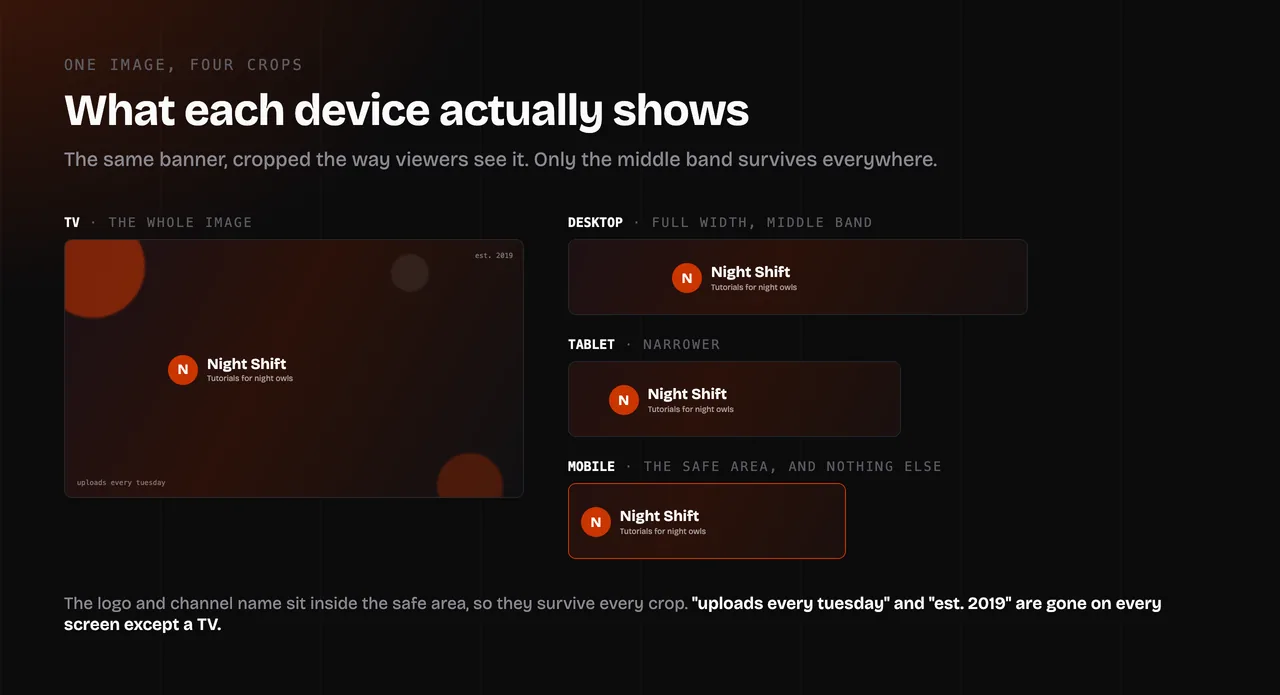
Two things follow from this table:
- Only TV viewers see the top and bottom of your banner. On a computer, a tablet or a phone, everything above and below the middle band is hidden.
- The sides disappear on smaller screens. Text near the left or right edge shows on desktop but is cut off on tablets and phones.
That is why so many banners look fine on a computer and broken on a phone.
Free YouTube banner template
This template marks every device area on a 2560 × 1440 canvas:
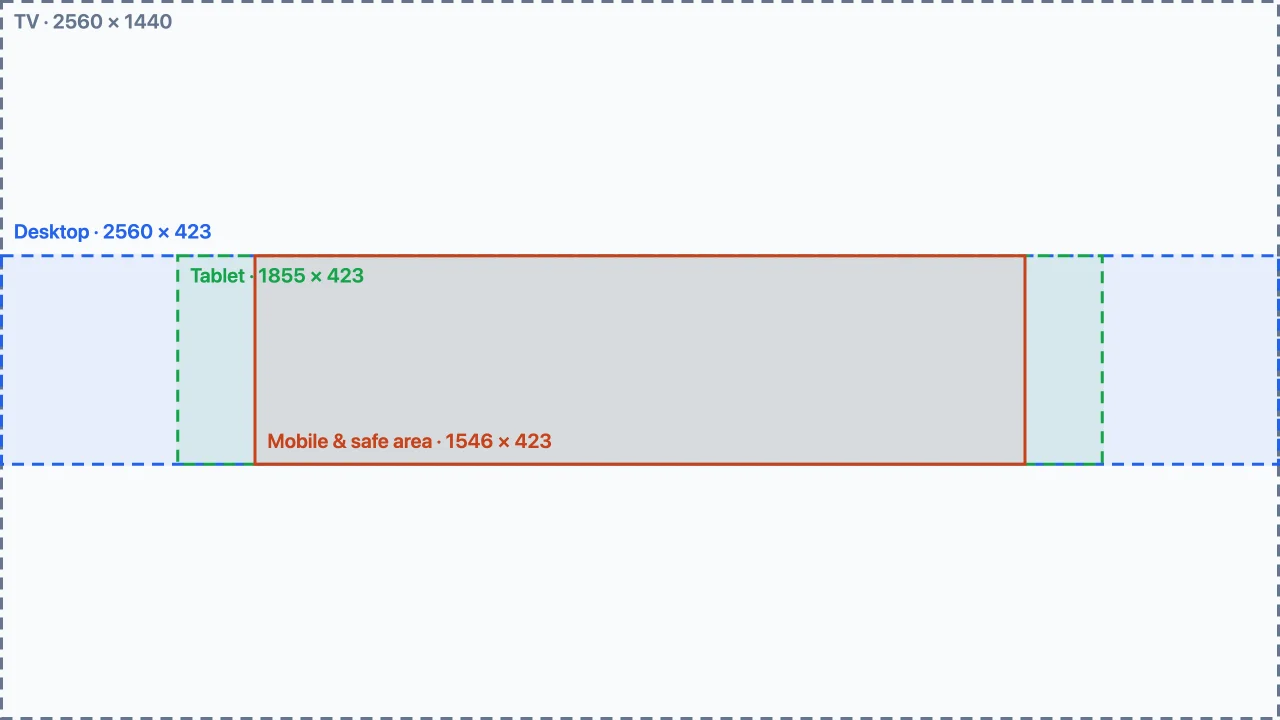
To get the full-size PNG, open the YouTube Banner Preview tool and click Download template. The file is 2560 × 1440 pixels, the YouTube banner template size YouTube recommends.
How to use it in Canva, Photoshop, Figma or any other editor:
- Create a new design at 2560 × 1440 pixels.
- Place the template as the bottom layer and lock it.
- Put your background across the whole canvas, then keep text and logos inside the orange safe area.
- Hide or delete the template layer.
- Export as JPG or PNG and check that the file is under 6 MB.
How to check your banner before you upload it
YouTube Studio shows a crop preview when you upload a banner, but it doesn't show your full channel page, and you need the final image ready before you can try it. It is quicker to check while you design.
The free TubeKit YouTube Banner Preview shows your banner the way viewers will see it:
- Four device views: switch between TV, desktop, tablet and mobile to see exactly which part of the image survives.
- Safe area guides: turn on the outlines to spot text that sits too close to an edge.
- Channel page mockup: see the banner on a mock channel page with your profile picture, channel name, Subscribe button and tabs.
- Size check: the tool tells you if the image is below the minimum or recommended size, not 16:9, or over 6 MB.
Your image is processed in your browser and never uploaded anywhere.
How to change your banner on YouTube
- Sign in to YouTube Studio.
- From the left menu, select Customization, then Profile.
- Next to Banner image, click Change and choose your image.
- Adjust the crop if you need to, then click Done.
- Click Publish.
Check it on your phone afterwards, since that is where most cropping problems show up.
Common YouTube banner problems and how to fix them
My banner is cut off on my phone. Text or a logo sits outside the safe area. Move it into the middle 1546 × 423 pixels, or shrink it so it fits. You can check the result in the mobile view of the banner preview tool.
My banner looks blurry on TV. The image is smaller than 2560 × 1440, or it was compressed too much. Export at 2560 × 1440 and use a high JPG quality, or PNG for flat graphics and text.
YouTube says the image is too small. The banner must be at least 2048 × 1152 pixels. Resize it to 2560 × 1440 instead of the minimum, so it still looks good on large screens.
YouTube says the file is too big. The limit is 6 MB. Export as JPG instead of PNG, lower the quality slightly, or remove hidden layers and metadata.
Parts of the image are missing after upload. The image isn't 16:9, so YouTube crops it to 16:9 from the center. Crop it to 16:9 yourself (2560 × 1440 is 16:9) so you decide what stays, then upload it again.
Other YouTube image sizes
| Image | Size |
|---|---|
| Channel banner | 2560 × 1440 px recommended, at least 2048 × 1152 px, up to 6 MB |
| Profile picture | Square image, shown at 98 × 98 px, up to 15 MB; JPG, GIF, BMP or PNG (no animated GIFs) |
| Video thumbnail | 16:9, 3840 × 2160 px recommended, at least 640 px wide; many creators use 1280 × 720 px |
| Video watermark | Square, at least 150 × 150 px, under 1 MB |
For the profile picture, upload a square image of at least 800 × 800 pixels so it stays sharp on high-resolution screens, and keep the subject in the center, because YouTube shows it as a circle.
Making a thumbnail too? Read the YouTube thumbnail size guide for videos and Shorts, then check it in the free YouTube Thumbnail Preview, which shows it on the home feed, in search, in Up next and on mobile, next to real videos.
FAQ
What size is a YouTube banner? 2560 × 1440 pixels, with a 16:9 aspect ratio. The minimum is 2048 × 1152 pixels and the maximum file size is 6 MB.
What YouTube banner size is viewable on all devices? Only the safe area in the middle, about 1546 × 423 pixels on a 2560 × 1440 banner (1235 × 338 pixels on a 2048 × 1152 banner). Everything outside it is cut off on at least one device.
What is the minimum YouTube banner size? 2048 × 1152 pixels. YouTube won't accept a smaller image, and it recommends 2560 × 1440 for the best result on TV.
What are the YouTube banner dimensions in an aspect ratio? 16:9, the same as a widescreen video. Common 16:9 sizes are 2560 × 1440 (recommended) and 2048 × 1152 (minimum).
How do I resize an image to YouTube banner size? Crop the image to 16:9, then resize it to 2560 × 1440 pixels. Any image editor works, including Preview on a Mac and Photos on Windows. Afterwards, check where the edges are cut off with a banner preview.
Why does my YouTube banner look different on my phone? Phones show only the middle strip of the banner, about 1546 × 423 pixels on a 2560 × 1440 image. The top, bottom and sides are hidden.
Is there a free YouTube banner template? Yes. The template above marks the TV, desktop, tablet and mobile areas. Download the full-size 2560 × 1440 PNG from the YouTube Banner Preview tool.