

YouTube Thumbnail Size Guide for Videos and Shorts
The YouTube thumbnail size is 3840 × 2160 px (16:9), at least 640 px wide and under 50 MB. Shorts use 2160 × 3840. Here is what to export and why.
Quick answer: YouTube recommends a thumbnail size of 3840 × 2160 pixels with a 16:9 aspect ratio. The minimum width is 640 pixels, and 1280 × 720 is still a very common size. Upload a JPG or PNG under 50 MB from a computer, or under 2 MB from the phone app. Shorts thumbnails are vertical: 2160 × 3840 pixels, 9:16.
Before you upload, check how your thumbnail looks at the small sizes viewers actually see with the free YouTube Thumbnail Preview.
YouTube thumbnail size and dimensions
These are YouTube's current recommended thumbnail dimensions for videos:
| Spec | Video thumbnails |
|---|---|
| Recommended size | 3840 × 2160 px |
| Common size | 1280 × 720 px |
| Minimum width | 640 px |
| Aspect ratio | 16:9 |
| File format | JPG or PNG |
| Maximum file size | 50 MB from a computer, 2 MB from the phone app |
Source: YouTube Help, "Add custom thumbnails on YouTube" (checked October 2026).
YouTube asks for a thumbnail that is "as large as possible", because the same image is also used as the preview in the embedded player. A large, sharp image looks good everywhere, from a phone in portrait mode to a 4K TV.
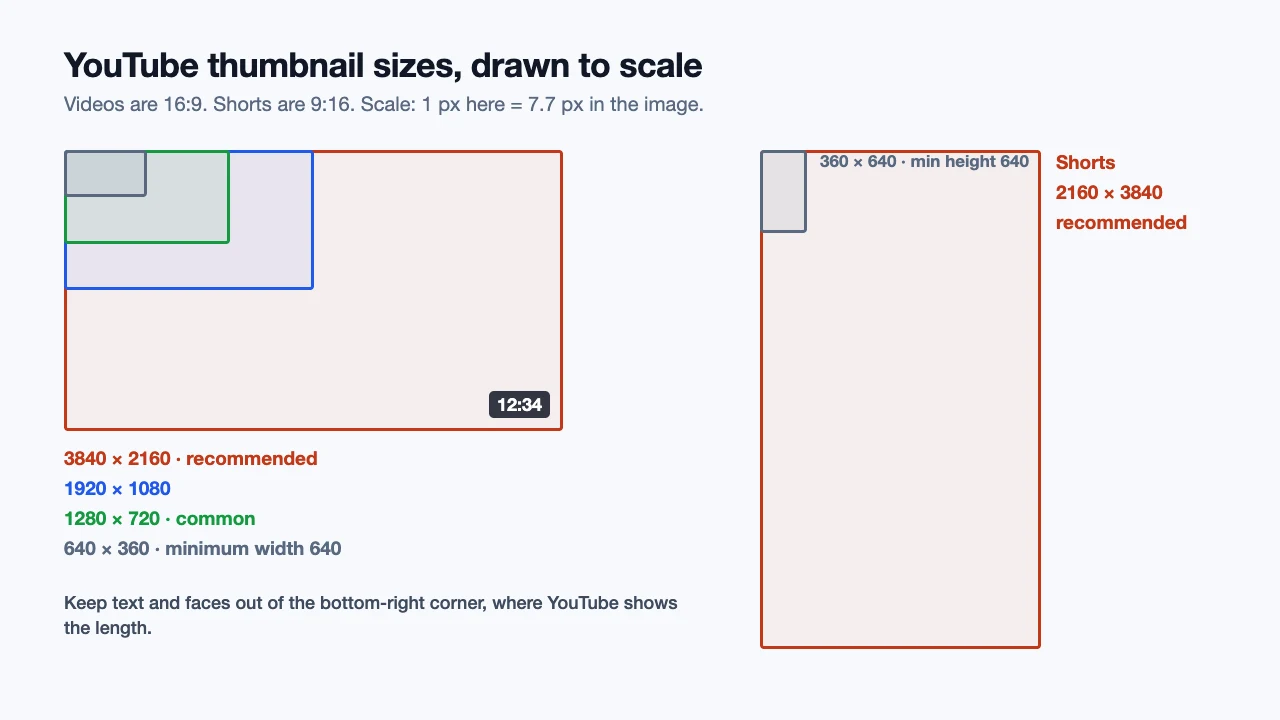
1280 × 720 or 3840 × 2160: which should you use?
For years, YouTube's guidance was 1280 × 720 pixels. Its help page now recommends 3840 × 2160 (4K). Both are 16:9, and YouTube accepts both, so the choice comes down to quality and file size.
Use 3840 × 2160 when you can. If your thumbnail is built from a sharp photo or a screenshot of 4K footage, exporting at 4K keeps it crisp on large screens and in embedded players.
1280 × 720 is still fine. It is sharp on phones, laptops and most monitors, it keeps files small, and it is the size most templates and editors use. Our thumbnail tester treats anything 1280 pixels wide or more as sharp.
Don't upscale a small image. Stretching a 1280 × 720 file to 3840 × 2160 doesn't add detail. It only makes the file bigger. Export at 4K only when your design and source images are 4K.
Watch the file size. A 4K PNG with photos can easily go over 2 MB, which is the limit in the YouTube app. Upload it from a computer (up to 50 MB) or save it as a JPG.
YouTube Shorts thumbnail size
Shorts thumbnails are vertical:
| Spec | Shorts thumbnails |
|---|---|
| Recommended size | 2160 × 3840 px |
| Minimum height | 640 px |
| Aspect ratio | 9:16 |
| Maximum file size | 50 MB (uploaded from a computer) |
A few things work differently for Shorts:
- You can only add a custom Shorts thumbnail in YouTube Studio on a computer. In Studio, open Content, switch to the Shorts tab, open the Short and upload the image below Thumbnail.
- Your account must be verified, just like for video thumbnails.
- Vertical videos with a 16:9 thumbnail get an auto-generated 4:5 thumbnail on the home, explore and subscription pages. Your 16:9 image still shows in places like the watch feed and watch history. Use a 9:16 image if you want your own design everywhere.
For podcast playlists, YouTube asks for a square 1:1 thumbnail instead.
Thumbnail file size and format
YouTube recommends JPG or PNG:
- JPG is best for photos and keeps the file small. Export at a high quality setting (around 85–90%) to avoid blotchy faces and text.
- PNG is best for flat graphics, bold text and logos, but files get large at 4K.
The size limit depends on where you upload from:
| Uploading from | Limit |
|---|---|
| Computer (YouTube Studio) | 50 MB for videos, Shorts and podcasts |
| Phone app | 2 MB for video thumbnails, 10 MB for podcasts |
If your file is too large, save it as a JPG, lower the quality slightly or export at 1280 × 720.
How big your thumbnail really looks
You design at 3840 × 2160 or 1280 × 720, but most viewers see your thumbnail much smaller: a card on the home feed, a row in search results, a small tile in the Up next list, or a phone screen. Text that looks huge in your editor can be unreadable at that size.
Two things are easy to miss:
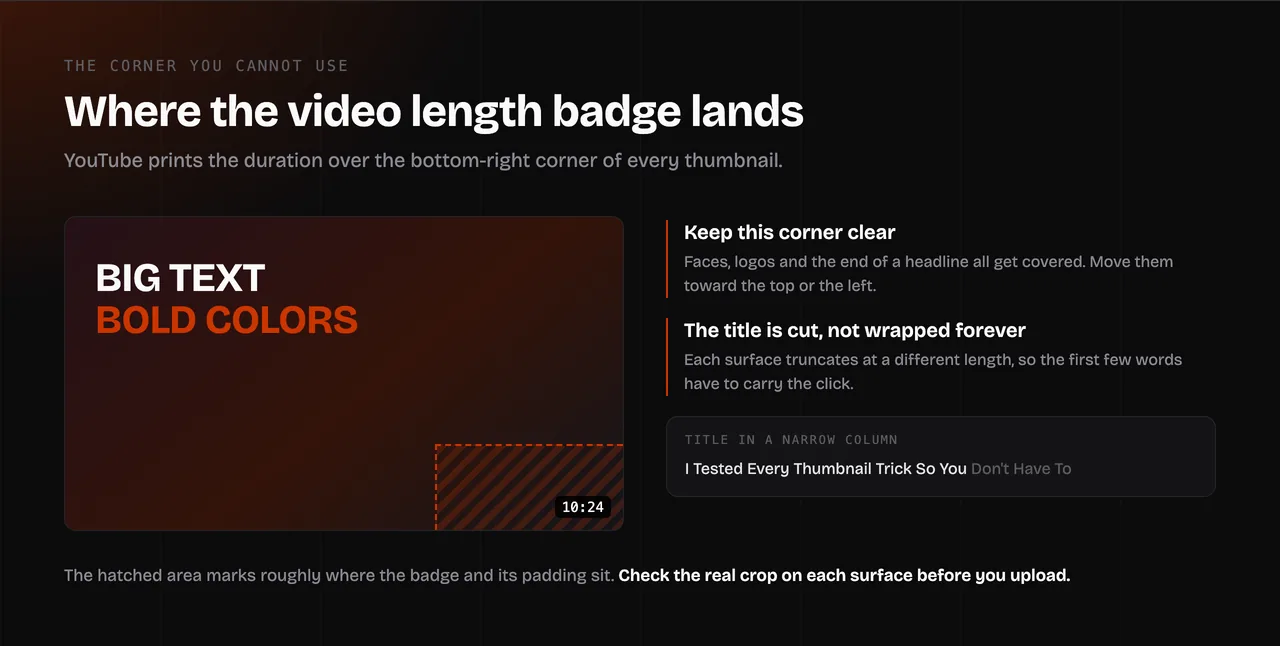
- The bottom-right corner is covered. YouTube shows the video length there. Keep faces, text and logos out of that corner.
- Your title sits next to the image. Titles are cut off at different lengths in each view, so the image and the first few words of the title need to work together.
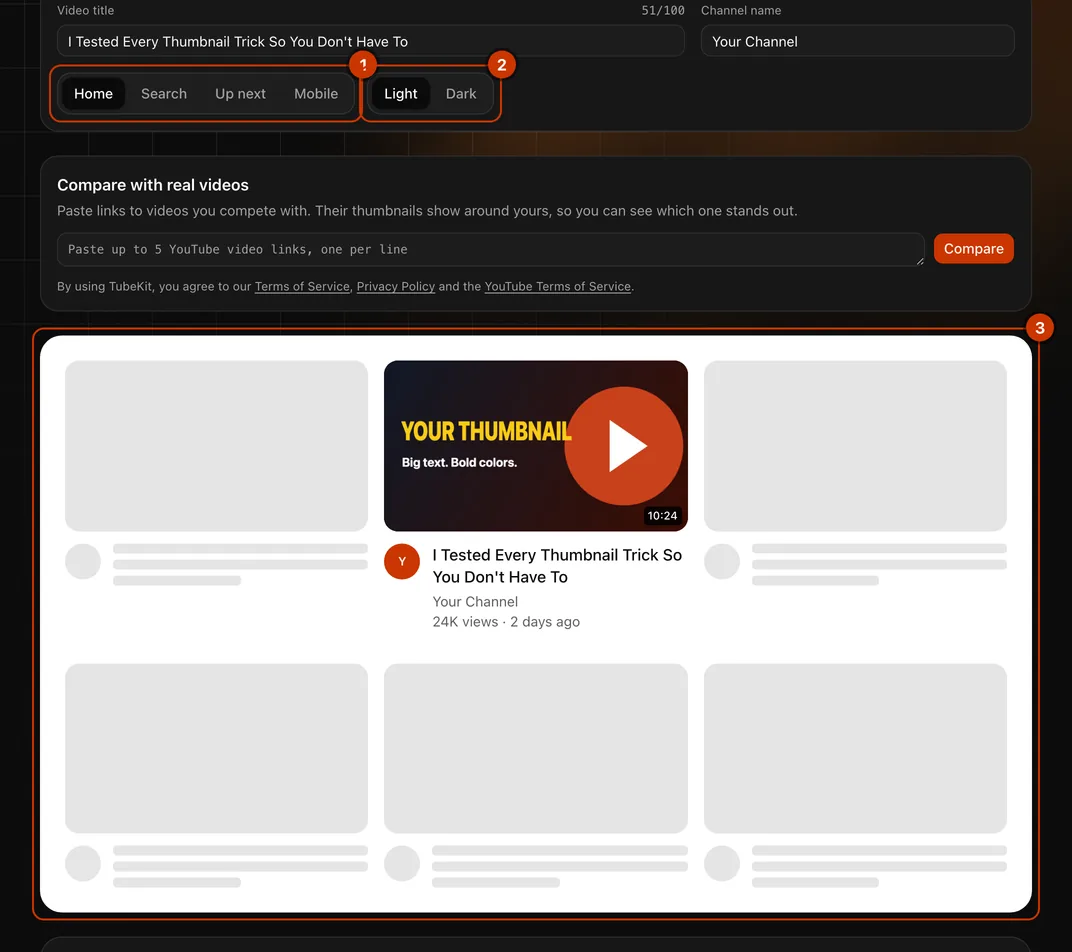
The free TubeKit YouTube Thumbnail Preview shows your thumbnail and title the way viewers will see them:
- Four views: home feed, search results, Up next and mobile.
- Light and dark mode: see whether your colors still stand out on both.
- Title cut-off: see where your title gets truncated in each view.
- Compare with real videos: paste up to five competitor links and put your thumbnail next to theirs.
- Size check: it warns you if the image is narrower than 640 px, not 16:9, over 2 MB or 50 MB, or not a JPG or PNG.
Your image is processed in your browser and never uploaded.
How to add a custom thumbnail on YouTube
- Sign in to YouTube Studio on a computer.
- From the left menu, select Content.
- Open the video you want to edit.
- Below Thumbnail, click Upload file and choose your image.
- Click Save.
It can take a little while for a new thumbnail to show up on YouTube. Custom thumbnails need a verified account, and there is a daily limit on how many you can upload. If you see "Daily custom thumbnail limit reached", try again in 24 hours.
Common YouTube thumbnail problems and how to fix them
My thumbnail looks blurry. The image is too small or too compressed. Export at 1280 × 720 or larger and use a high JPG quality, or PNG for text-heavy designs.
There are black bars around my thumbnail. The image isn't 16:9. Crop it to 16:9 (for example 1280 × 720 or 3840 × 2160) before you upload.
The app says my file is too large. The YouTube app only accepts thumbnails up to 2 MB. Upload from YouTube Studio on a computer instead, where the limit is 50 MB, or save a smaller JPG.
I can't upload a custom thumbnail. Your account probably isn't verified yet, or you have reached the daily limit. Verify your account in YouTube Studio, or try again the next day.
My text is hidden in the corner. The video length badge covers the bottom-right corner. Move text and faces toward the top or the left, then check every view in the thumbnail preview.
My new thumbnail isn't showing. Changes can take time to appear across YouTube. Refresh later, and check the video in a private window.
Other YouTube image sizes
| Image | Size |
|---|---|
| Video thumbnail | 3840 × 2160 px recommended, at least 640 px wide, 16:9 |
| Shorts thumbnail | 2160 × 3840 px recommended, at least 640 px tall, 9:16 |
| Podcast playlist thumbnail | Square, 1:1 |
| Channel banner | 2560 × 1440 px recommended, at least 2048 × 1152 px, up to 6 MB |
| Profile picture | Square, shown at 98 × 98 px, up to 15 MB |
Designing your channel banner too? Read the YouTube banner size guide for the safe area and a free template, or test it in the YouTube Banner Preview.
FAQ
What size are YouTube thumbnails? YouTube recommends 3840 × 2160 pixels at 16:9. The minimum width is 640 pixels, and 1280 × 720 is a very common size.
Is 1280 × 720 still a good thumbnail size? Yes. It is 16:9, YouTube accepts it, and it looks sharp on phones, laptops and most monitors. Use 3840 × 2160 if your images are high resolution and you want the best result on large screens.
What is the file size limit for a YouTube thumbnail? 50 MB when you upload from a computer, and 2 MB when you upload from the YouTube app (10 MB for podcast thumbnails).
What are the YouTube thumbnail dimensions? 3840 × 2160 pixels is recommended and 1280 × 720 is common. Both are 16:9. Shorts thumbnails are 2160 × 3840 pixels, 9:16, and podcast playlists use a square 1:1 image.
What size is a YouTube Shorts thumbnail? 2160 × 3840 pixels, 9:16, with a minimum height of 640 pixels. You can only add one in YouTube Studio on a computer.
Should a YouTube thumbnail be a PNG or a JPG? Either works. Use JPG for photos and smaller files, and PNG for graphics and text. Keep it under 2 MB if you upload from your phone.
How can I test my thumbnail before uploading? Use the free YouTube Thumbnail Preview. It shows your thumbnail on the home feed, in search, in Up next and on mobile, in light and dark mode, next to real videos.